How to make an illustrated parts catalogue from CAD
An illustrated parts catalogue is a set of pages a customer uses to order the right spare: a picture with numbers, and a table that says what each number is. The CAD assembly already holds both halves; the work is making them agree.
4 min read7 sources
If you build machines, sooner or later a customer asks for a spare and describes it as "the wee bracket behind the motor". A parts catalogue saves that phone call. Each page shows one assembly or sub-assembly, exploded so every part can be seen, with a numbered balloon on each part and a table that turns the number into a name, a part number and a quantity.
What a parts page needs
- One assembly per page. A whole machine on one sheet is unreadable. Split it the way a fitter would take it apart: frame, drive, guards, controls.
- An exploded view, so parts that hide each other in the assembled machine each get a clear outline to point at.
- A balloon on every orderable item, with a leader that ends on the part's own line work, not in the gap beside it.
- A parts table with at least the item number, the name, the quantity on this page and the number the customer orders by.
- A title and a revision on the sheet, so a customer holding an old copy can tell.
How the numbering ties the picture to the table
The item number is the only thing the picture and the table share, so it has to come from one place. Number the items once, from the assembly, and let every balloon and every table row read that number. Six identical servos are one item with a quantity of six, not six items. If you renumber, every page that shows the item has to change with it, which is why typing numbers into balloons by hand goes wrong on the second revision.
Fusion's Drawing workspace works this way. Tables → Parts List places the list and balloons the view for you, and the balloons stay tied to it:
“The numbers in the balloons match the Item numbers for each component in the parts list.”
In FreeCAD 1.0, Assembly → Bill of Materials makes the list, and a column named with a full stop and a property, such as .PartNumber, is filled from each part. TechDraw's Balloon Annotation adds balloons one at a time, and you type each balloon's text yourself, so checking that they agree with the list is your job.
Why the CSV matters
The table on the page is for a person. The same list as a CSV file is for your systems: it is the format a spreadsheet, an ERP import or a webshop's product upload will usually take. If the catalogue and the webshop are fed from one file, item 8 on the page and item 8 in the shop are the same screw. If someone retypes the list, sooner or later they aren't. Keep the CAD name in the CSV even when you don't print it, so every row can be traced back to the model.
A worked example
The page below is the leader arm of Alexander Koch's open-source robot arm, a STEP assembly of 91 placed parts, drawn by Lineplate's own pipeline. Its parts list grouped those 91 placements into 16 items, and the table under it is the CSV the studio wrote, row for row. The names are the ones in the CAD file. Before a real catalogue went out, shoulder_rotation and connector would be renamed, and a column for your own part numbers added.
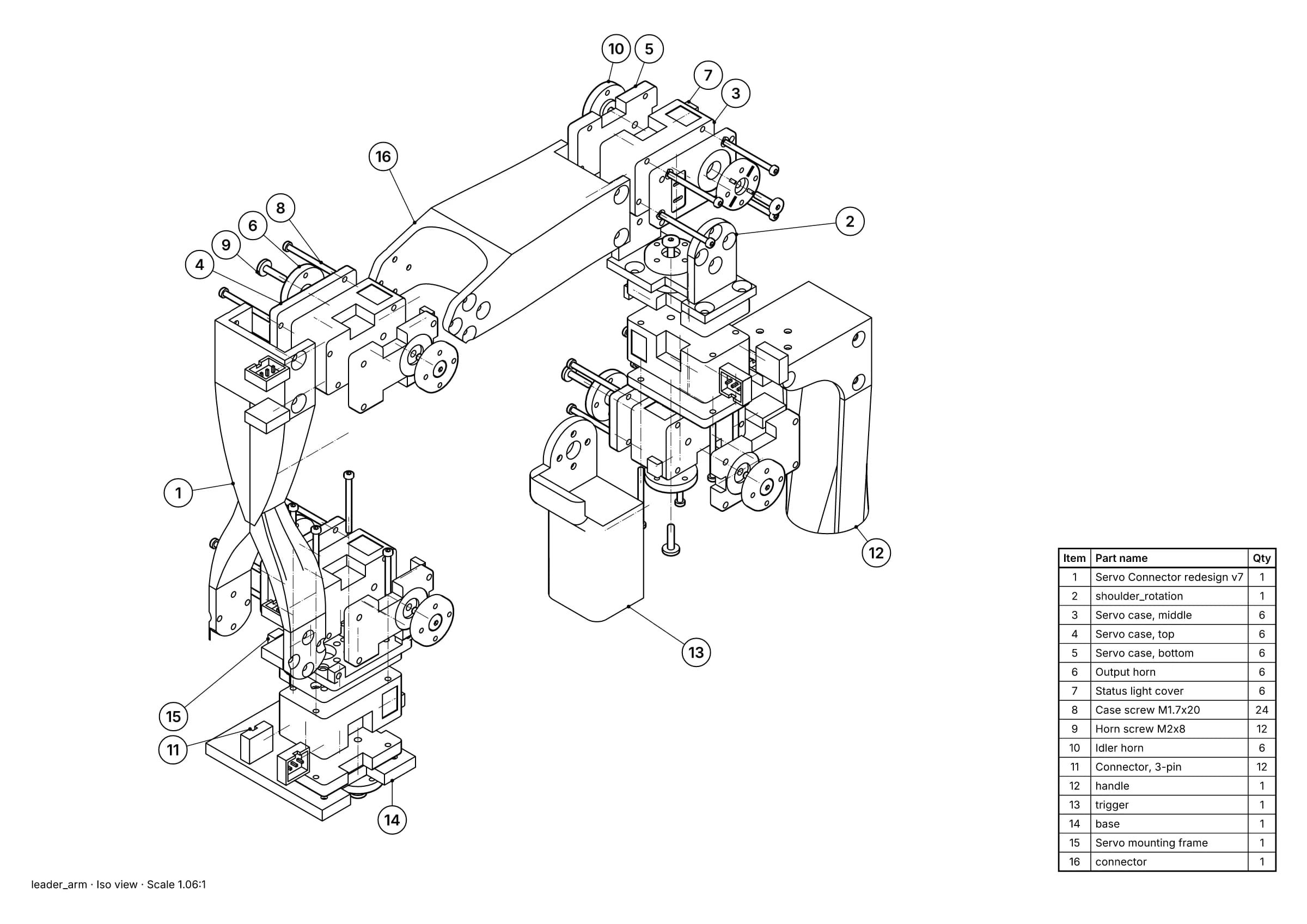
Fig. 1 · leader_arm.step · 16 balloons · 16 items · A3
An illustrated parts page made from a STEP file: an exploded view with 16 numbered balloons and the parts list on the sheet. Leader arm of Alexander Koch's low-cost robot arm. Model © 2024 Alexander Koch, MIT licence; servo and frame models by Galaxy Technology.
| Item | Part name | Qty | CAD name |
|---|---|---|---|
| 1 | Servo Connector redesign v7 | 1 | Servo Connector redesign v7:1 |
| 2 | shoulder_rotation | 1 | shoulder_rotation:1 |
| 3 | Servo case, middle | 6 | Servo case, middle:1 |
| 4 | Servo case, top | 6 | Servo case, top:1 |
| 5 | Servo case, bottom | 6 | Servo case, bottom:1 |
| 6 | Output horn | 6 | Output horn:1 |
| 7 | Status light cover | 6 | Status light cover:1 |
| 8 | Case screw M1.7x20 | 24 | Case screw M1.7x20:1 |
| 9 | Horn screw M2x8 | 12 | Horn screw M2x8:1 |
| 10 | Idler horn | 6 | Idler horn:1 |
| 11 | Connector, 3-pin | 12 | Connector, 3-pin:1 |
| 12 | handle | 1 | handle:1 |
| 13 | trigger | 1 | trigger:1 |
| 14 | base | 1 | base:1 |
| 15 | Servo mounting frame | 1 | Servo mounting frame:1 |
| 16 | connector | 1 | connector:1 |
Aviation and defence standards
Some industries define how parts data must be written. S1000D, an international specification for technical publications using a common source database, is free to download and is used for defence systems and civil aviation, among others. ATA iSpec 2200, sold by Airlines for America, is the aviation standard for the content and exchange of aircraft maintenance information. If your customer's contract names either, you need tools built for it.
Keep the catalogue right after a design change
- Keep each item's number when the part changes shape but is still ordered the same way. A spares desk that knows item 8 is the case screw doesn't want it to become item 9.
- Give new parts new numbers at the end of the list rather than renumbering everything.
- Mark removed items as superseded instead of reusing their numbers, because old copies of the page are still out there.
- Before reissuing, count each item on the page and in the model, and check the quantities match.
Sources
- 01Create a parts list, Autodesk Fusion Help. Read 19 October 2026.
- 02Create balloons, Autodesk Fusion Help. Read 19 October 2026.
- 03Assembly CreateBom, FreeCAD Documentation. Read 19 October 2026.
- 04TechDraw Balloon, FreeCAD Documentation. Read 19 October 2026.
- 05S1000D: International specification for technical publications using a common source database, S1000D Council. Read 19 October 2026.
- 06S1000D, Wikipedia. Read 19 October 2026.
- 07iSpec 2200: Information Standards for Aviation Maintenance, Revision 2025.1, A4A Publications. Read 19 October 2026.