Inventor Presentations: when you don't need another tool
If you have Inventor, you already have exploded views that stay in step with the model, drawings with balloons tied to the parts list, and PDF export. For many Inventor users that is all they need. Here is what it covers, and the few cases where a separate tool helps.
Facts checked 5 sources
The short answer
If you design in Inventor and your instructions are drawings of your own assemblies, use Inventor: presentations and drawings already do this, stay associative with the model, and are part of it. Lineplate is for the cases Inventor doesn't reach: people without an Inventor seat, models that arrive as STEP files, and SVG line art or laid-out manuals.
This page mostly tells Inventor users to keep using Inventor. Inventor has a presentation environment built in, and Autodesk's help describes the whole route from exploded view to ballooned drawing:
“Insert an assembly model and create tweaks, trails, and snapshot views. Use snapshot views to create exploded drawing views or raster images of the model. Or, create animations, and output them as video files.”
Put a snapshot view on a drawing sheet, balloon it, add the parts list, and export a PDF. The balloons follow the parts list, and the views follow the model. If the instructions are drawings of your own Inventor assemblies, that is a complete workflow, and nothing we make improves on its associativity.
Side by side
Every fact about Inventor comes from Autodesk's Inventor 2026 help, read on the date shown, and the price from a US reseller. Every fact about Lineplate is what its code does today.
| Feature | Autodesk Inventor Presentations | Lineplate |
|---|---|---|
| Exploded views | Presentation files (.ipn) with tweaks, trails and snapshot views. Snapshot views become exploded drawing views.[1] | Automatic exploded views: each part moves out in a straight line, checked for collisions, then adjusted by hand. Parts that can't come out in a straight line are kept together and listed. |
| When the design changes | Presentations stay associative with the model, and drawing views made from them update without opening the presentation.[1] | Drop in the new STEP file: parts are matched and balloons, numbers, the exploded view and steps are carried across, with anything uncertain listed for review (Pro). |
| Balloons and parts lists | Balloons in drawings, numbered to match the parts list.[3] | Automatic balloons with leaders, numbered from one parts list shared by every drawing. The list goes on the sheet as a table and out as CSV (Pro). |
| Sequences | Storyboards hold a sequence of snapshot views and animations of the model and camera, which output as video.[1] | Assembly steps worked out from the exploded view, then edited by hand. A manual builder lays out a cover, a parts list with a picture of each part, step pages and your own text, exported as a PDF with bookmarks, or as SVG or PNG pages (Pro). |
| Output from presentations | Raster images (BMP, GIF, JPEG, PNG, TIFF) and video. Vector output goes through a drawing.[2][1] | PNG at 150, 300 or 600 dpi. |
| Output from drawings | DWF, DWFx, DWG, DXF, PDF and raster images. SVG isn't in the list.[4] | SVG, with circles and arcs written as true arcs, and vector PDF (PDF/A-2b, in RGB or in CMYK with the FOGRA39 profile; the leader arm's manual passed veraPDF on 5 October 2026). No EPS or CGM. |
| CAD it opens | An Inventor assembly: each presentation scene has a source assembly file.[1] | STEP (.step, .stp), IGES (.iges, .igs) and OpenCASCADE BREP only. Native SOLIDWORKS, Creo or Inventor files need exporting to STEP first. A mesh-only file opens in 3D but gives no line drawing. |
| Price | Presentations are part of Inventor. Inventor Professional 2026: $2,852.84 for a one-seat annual subscription (CDW-G, US; VAT and sales tax not stated).[1][5] | Free: drawings of up to 250 parts, with no watermark. Pro: £49 a month per editor, or £490 a year. No VAT is charged: Galaxy Technology isn't VAT registered. |
What our output looks like
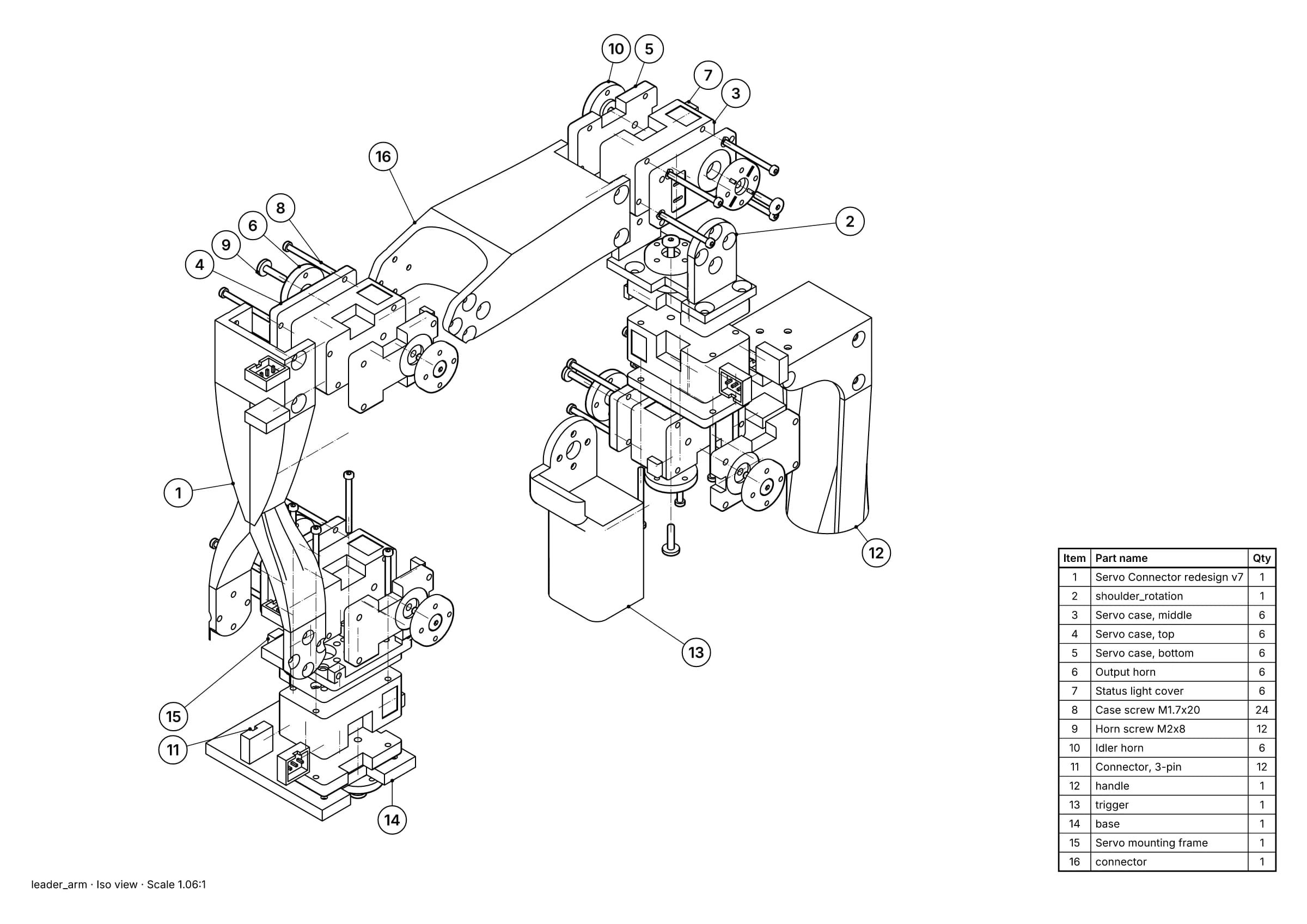
Fig. 1 · leader_arm.step · 16 balloons · 16 items · A3
A parts page made from a STEP file: exploded view, balloons and parts list as vector line art, exported to SVG and PDF. Leader arm of Alexander Koch's low-cost robot arm. Model © 2024 Alexander Koch, MIT licence; servo and frame models by Galaxy Technology.
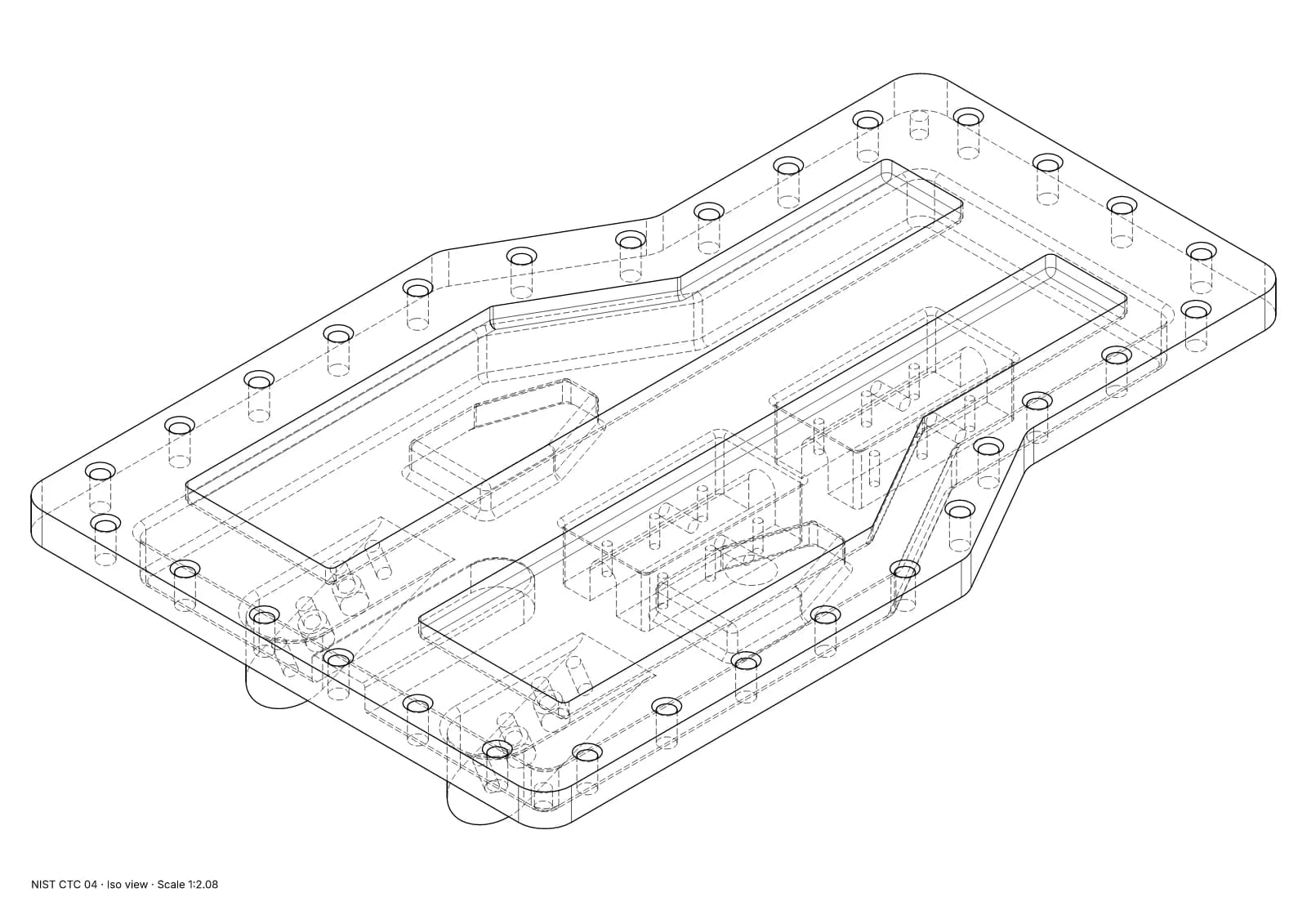
Fig. 2 · NIST CTC 04 · iso view · Technical · 1:2.08 · 854 true arcs · 0 fragments · 0 duplicates
A single part with exact hidden-line removal, written to SVG with true arcs. NIST MBE PMI test part, a US government work used without restriction.
What Autodesk Inventor Presentations does well
- If you have Inventor, it is already there, with nothing else to buy.
- Exploded views stay associative: change the model, and drawings made from the presentation update.
- Balloons in drawings are numbered to match the parts list.
- Storyboards animate the assembly and output video, which we don't do at all.
- Drawings export to DWG and DXF as well as PDF, for anyone who needs to edit them in CAD.
Where Lineplate falls short today
- Each project lives in the browser it was made in. Nothing syncs between machines or people, so moving a project means importing its CAD file again.
- It reads STEP, IGES and BREP, not native CAD files. From SOLIDWORKS, Creo or Inventor you export a STEP file first, and a STEP file that holds only a mesh (tessellated geometry) gives no line drawing.
- There is no 3D, video or animated output, and no EPS or CGM.
- Very large assemblies are slow to open in a browser. In our test, a 3D printer of 1,683 placed parts took about 6½ minutes to import with the in-browser kernel. Hidden-line views of open 1,000-part assemblies took 1½ to 5½ minutes, over our one-minute target, and left parts out.
- Auto-explode moves each part in a straight line. A part that can only come out with a twist or a dog-leg is kept together with what traps it and listed for you to deal with. On one 58-part extruder sub-assembly, 6 parts stayed together this way.
- We don't claim PDF/X. Our CMYK PDFs carry the PDF/X-4 structure, but no validator has passed them as PDF/X, so a printer who needs PDF/X should check the file.
When to choose Autodesk Inventor Presentations instead
- You design in Inventor and document your own assemblies. This is most Inventor users, and for them Inventor is the answer.
- You want documentation that updates with the model without exporting anything.
- You need DWG or DXF, or video of the assembly.
When Lineplate is the better fit
- The person making the manual doesn't have an Inventor seat, such as a technical author or a colleague in another office.
- The model came from a supplier as a STEP file and you don't want to bring it into Inventor to document it.
- You need SVG line art, for a website, a page-layout program or a translation workflow.
- You want a laid-out manual, with a cover, a parts list with a picture of each part, step pages and your own text, laid out for you.
Sources
- 01About Presentations, Exploded Views, and Publishing, Autodesk Inventor 2026 Help. Read 4 October 2026.
- 02To Publish Presentations to Raster Images, Autodesk Inventor 2026 Help. Read 4 October 2026.
- 03Balloons, Autodesk Inventor 2026 Help. Read 4 October 2026.
- 04About Saving and Exporting Data, Autodesk Inventor 2026 Help. Read 4 October 2026.
- 05Autodesk Inventor Professional 2026, new subscription (annual), 1 seat, CDW-G (US reseller). Read 4 October 2026. A US price; Autodesk's own store refused automated reads.
Facts about our studio describe its code on 4 October 2026. Prices change; check the source before you buy. If anything here is wrong, tell us at hello@lineplate.com and we'll correct it.
Autodesk and Inventor are trademarks of Autodesk, Inc. Lineplate is not affiliated with, endorsed by or sponsored by Autodesk.