An alternative to Creo Illustrate, compared honestly
PTC now sells Creo Illustrate as PTC Illustrate. It is an enterprise tool for service illustrations, parts catalogues and animations, tied into Creo and Windchill. Here is what it does, what it costs, and when a smaller browser tool working from STEP files is enough.
Facts checked 7 sources
The short answer
If you run Creo and Windchill, publish service parts catalogues from a service BOM, or need animations and CGM, PTC Illustrate is the right tool and Lineplate is not a replacement for it. If you need printed line drawings, ballooned parts pages and assembly manuals from STEP files, and a locked licence at £5,010 a year is more than the job warrants, Lineplate is built for that.
PTC's tool is an enterprise one, and ours does a smaller job. Both facts matter when you choose, so this page sets out what each does, with sources, and says plainly when PTC Illustrate is the better choice.
“Creo Illustrate enables you reuse CAD data to generate interactive, animated 3D technical illustrations that communicate complex service information easily and accurately.”
Side by side
Every fact about PTC Illustrate comes from PTC's own store or help pages for version 12.0, read on the date shown. Every fact about our studio is what its code does today.
| Feature | PTC Illustrate (formerly Creo Illustrate) | Lineplate |
|---|---|---|
| Runs on | Windows: Windows 11 64-bit is both the minimum and the recommended operating system. It runs on its own or with a Windchill server.[5] | A web page: nothing to install. |
| CAD it opens | Creo Parametric (up to 12.4), STEP AP203, AP214 and AP242, IGES, and more. SOLIDWORKS, Inventor, Solid Edge and CATIA V5 files are "Not available in Creo Illustrate Standard and Essentials". JT needs a separate licence.[3] | STEP (.step, .stp), IGES (.iges, .igs) and OpenCASCADE BREP only. Native SOLIDWORKS, Creo or Inventor files need exporting to STEP first. A mesh-only file opens in 3D but gives no line drawing. |
| Line art | Render modes with thick and thin edge lines and hidden lines removed; exploded views with explode lines.[2] | Exact hidden-line removal from the solid geometry, with three line styles (technical, illustration, heavy outline) and your own line weights. Automatic exploded views: each part moves out in a straight line, checked for collisions, then adjusted by hand. Parts that can't come out in a straight line are kept together and listed. |
| 2D output | CGM, SVG and IsoDraw.[4] | SVG, with circles and arcs written as true arcs, and vector PDF (PDF/A-2b, in RGB or in CMYK with the FOGRA39 profile; the leader arm's manual passed veraPDF on 5 October 2026). No EPS or CGM. |
| 3D and animation | Animated figures, and publishing to secure Creo View (.pvz) files.[2] | None. The output is 2D: drawings, and manuals as PDF, SVG or PNG pages. There is no video, animation or interactive 3D. |
| Parts lists | Callouts and an item list for each figure; a service BOM (sBOM) built from the engineering BOM; an interactive parts list that follows the sBOM. Version 12.0 added item lists in 2D figures.[2][1][7] | Automatic balloons with leaders, numbered from one parts list shared by every drawing. The list goes on the sheet as a table and out as CSV (Pro). |
| Step-by-step instructions | Animated figures, and sequences whose steps publish to 2D or 3D formats in one click.[2][1] | Assembly steps worked out from the exploded view, then edited by hand. A manual builder lays out a cover, a parts list with a picture of each part, step pages and your own text, exported as a PDF with bookmarks, or as SVG or PNG pages (Pro). |
| When the design changes | Linked imports update the illustration when the source data changes: new parts are added and removed parts deleted.[6] | Drop in the new STEP file: parts are matched and balloons, numbers, the exploded view and steps are carried across, with anything uncertain listed for review (Pro). |
| Data management | A direct link to Windchill for managing illustration assets.[2] | None. Files are read in your browser and aren't uploaded anywhere. |
| Price | Professional edition, annual subscription plus taxes, support included: £5,010 locked to one computer, £5,740 per registered user, £10,100 floating (PTC Store, GB). Prices valid through 31 May 2027.[1] | Free: drawings of up to 250 parts, with no watermark. Pro: £49 a month per editor, or £490 a year. No VAT is charged: Galaxy Technology isn't VAT registered. |
What our output looks like
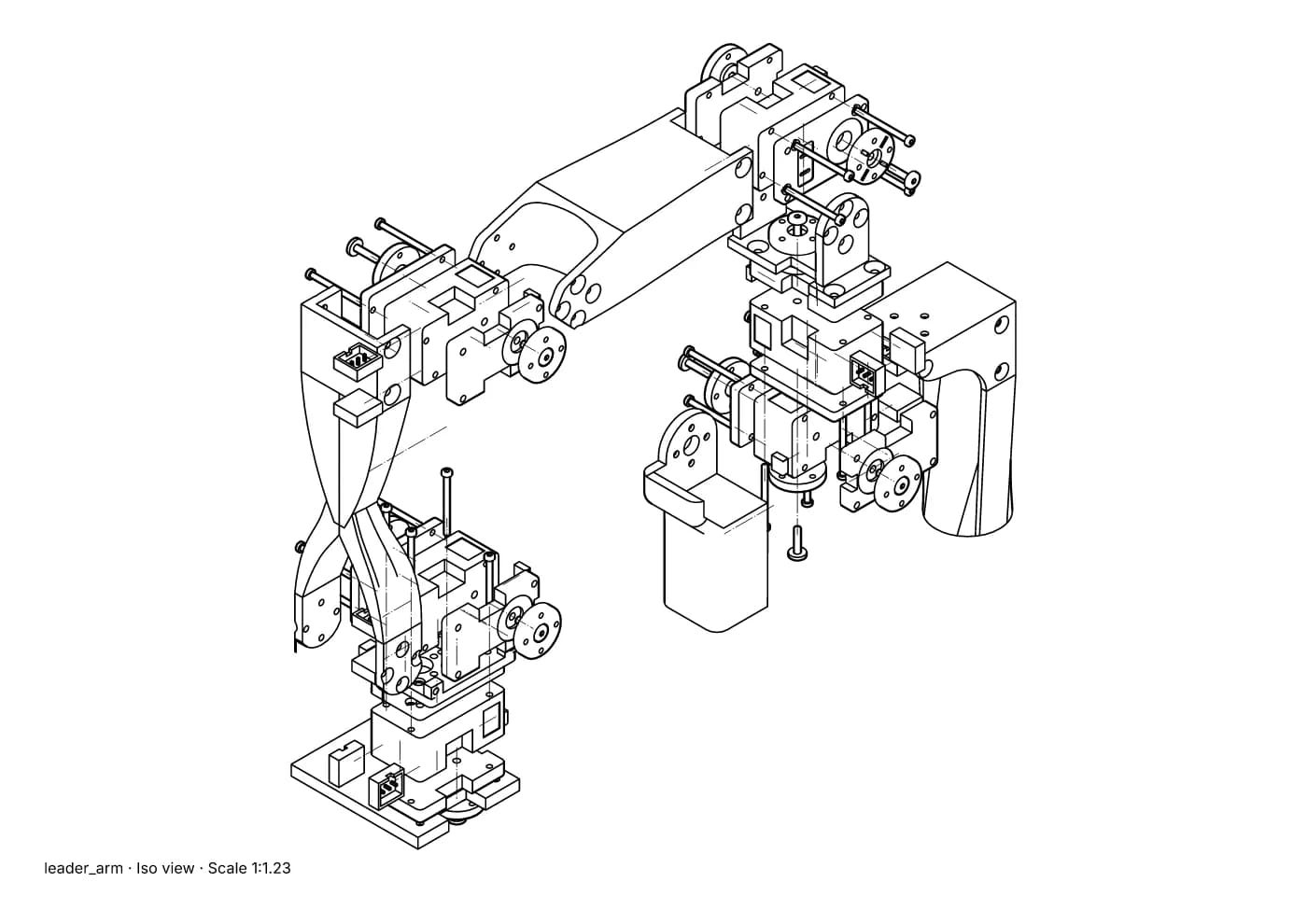
Fig. 1 · leader_arm.step · exploded iso · Illustration style · 90 of 91 placements moved · A4 1:1.23
An exploded view made automatically from a STEP file, with each part's path drawn as a thin chain line. Leader arm of Alexander Koch's low-cost robot arm. Model © 2024 Alexander Koch, MIT licence; servo and frame models by Galaxy Technology.
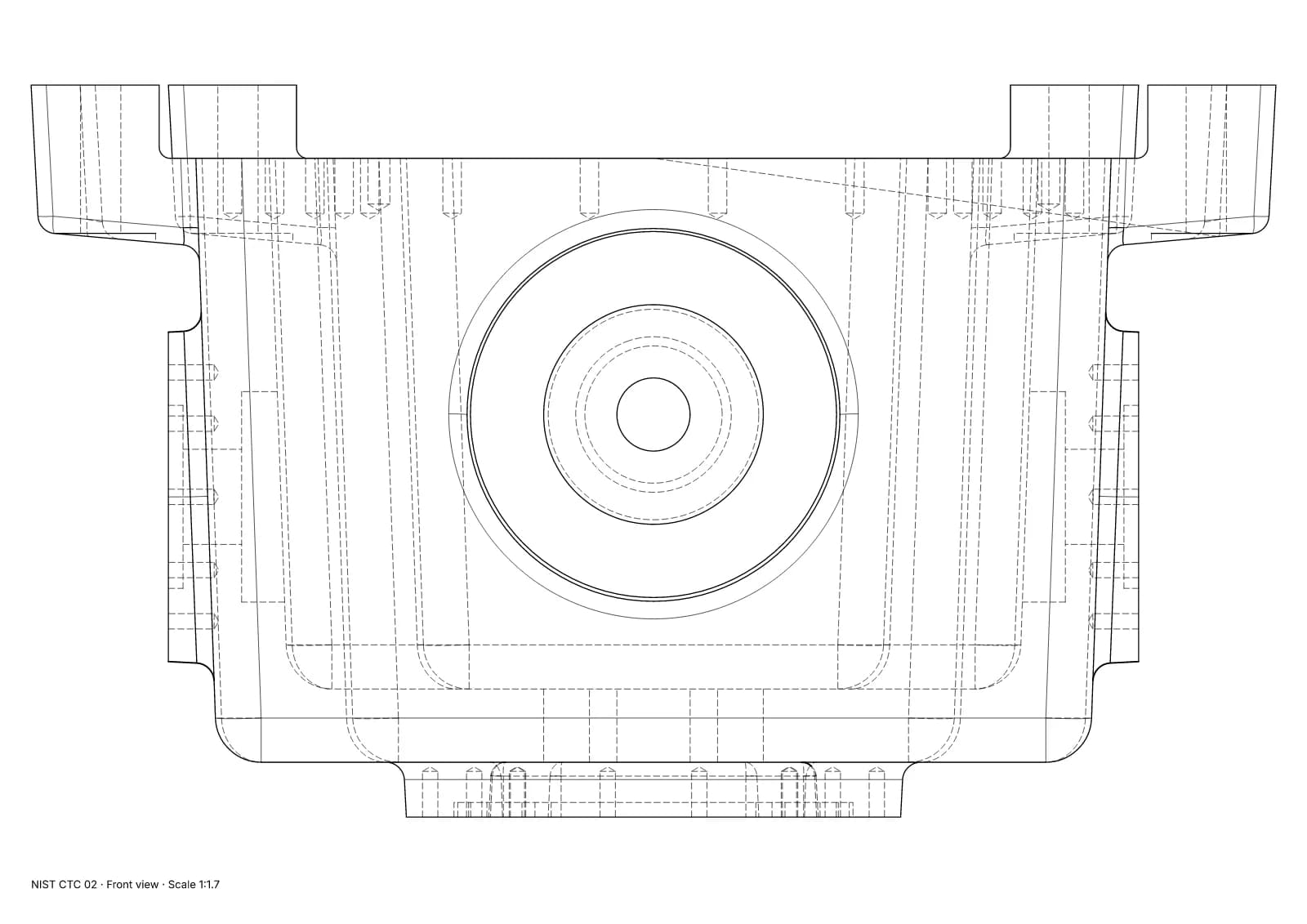
Fig. 2 · NIST CTC 02 · front view · Technical · 1:1.7 · 116 true arcs · 0 fragments · 0 duplicates
A front view of a single part with exact hidden-line removal and dashed hidden lines. NIST MBE PMI test part, a US government work used without restriction.
What PTC Illustrate (formerly Creo Illustrate) does well
- It is built around the service BOM: you restructure the engineering BOM into what a service technician needs, and the figures and item lists follow it.
- It opens Creo natively and, in the Professional edition, SOLIDWORKS, Inventor, Solid Edge and CATIA V5 too.
- Linked imports keep illustrations up to date as the CAD changes, and Windchill manages the files.
- It animates, and it publishes secure 3D files for Creo View as well as CGM and SVG for print.
- PTC is still developing it: version 12.0 added item lists and multi-item callouts in 2D figures.
Where Lineplate falls short today
- Each project lives in the browser it was made in. Nothing syncs between machines or people, so moving a project means importing its CAD file again.
- It reads STEP, IGES and BREP, not native CAD files. From SOLIDWORKS, Creo or Inventor you export a STEP file first, and a STEP file that holds only a mesh (tessellated geometry) gives no line drawing.
- There is no 3D, video or animated output, and no EPS or CGM.
- Very large assemblies are slow to open in a browser. In our test, a 3D printer of 1,683 placed parts took about 6½ minutes to import with the in-browser kernel. Hidden-line views of open 1,000-part assemblies took 1½ to 5½ minutes, over our one-minute target, and left parts out.
- Auto-explode moves each part in a straight line. A part that can only come out with a twist or a dog-leg is kept together with what traps it and listed for you to deal with. On one 58-part extruder sub-assembly, 6 parts stayed together this way.
- We don't claim PDF/X. Our CMYK PDFs carry the PDF/X-4 structure, but no validator has passed them as PDF/X, so a printer who needs PDF/X should check the file.
- Team shares a workspace and a bill, not files: there are no shared cloud projects, review links or single sign-on.
When to choose PTC Illustrate (formerly Creo Illustrate) instead
- You use Creo and Windchill, and want illustrations managed alongside the rest of your product data.
- You publish illustrated parts catalogues from a service BOM that differs from the engineering one.
- Your publishing system takes CGM, or your customers expect Creo View 3D files.
- You need animations, not only printed pages.
When Lineplate is the better fit
- You receive STEP files from suppliers or from CAD systems you don't run.
- You need printed output: line drawings with exact hidden lines, ballooned parts pages and assembly manuals as PDF.
- The parts list can follow the assembly as it is, with your own names, order and columns.
- You aren't on Windows, or can't install software on the machine you have.
- You only need a drawing now and then: the free plan makes drawings of up to 250 parts.
Sources
- 01PTC Illustrate, PTC Store. Read 4 October 2026. The store sells the Professional edition; annual prices plus taxes, support included.
- 02About Creo Illustrate (Creo Illustrate 12.0 Help), PTC Help Center. Read 4 October 2026.
- 03Supported Import File Formats for Creo Illustrate (12.0), PTC Help Center. Read 4 October 2026.
- 04To Save a Figure as a 2D Illustration File (12.0), PTC Help Center. Read 4 October 2026.
- 05System Prerequisites, Creo Illustrate Installation and Configuration Guide (12.0), PTC Help Center. Read 4 October 2026.
- 06Linking, Embedding, and Updating Imported Content (12.0), PTC Help Center. Read 4 October 2026.
- 07Welcome to Creo Illustrate 12.0.0.0 Help (What's New), PTC Help Center. Read 4 October 2026.
Facts about our studio describe its code on 4 October 2026. Prices change; check the source before you buy. If anything here is wrong, tell us at hello@lineplate.com and we'll correct it.
PTC, Creo, Creo Illustrate, PTC Illustrate, Arbortext and Windchill are trademarks of PTC Inc. Lineplate is not affiliated with, endorsed by or sponsored by PTC.