Cortona3D RapidAuthor or a print-first tool: an honest comparison
RapidAuthor is a desktop suite for interactive 3D technical publications, parts catalogs and training, with the standards that aerospace and defence documentation uses. Our studio does a much smaller job: printed line drawings and PDF manuals from a STEP file. Here is how to tell which you need.
Facts checked 9 sources
The short answer
If you publish interactive 3D manuals, parts catalogs or training, or your documents must follow S1000D, ATA 2200 or DITA, RapidAuthor is built for that and Lineplate isn't. If what you need is clean line drawings, a ballooned parts list and a printable PDF manual from a STEP file, Lineplate does that in a browser without a desktop installation.
Cortona3D's RapidAuthor is a suite for technical publications made from CAD data: RapidManual for manuals and work instructions, RapidCatalog for parts catalogs, RapidLearning for training and RapidIllustrator for illustrations. Its customers include aircraft and machinery manufacturers, and its main output is interactive 3D. Lineplate is much narrower. It makes 2D line drawings, ballooned parts lists and printable manuals from a STEP file, in a browser, and nothing in 3D.
Both can print. RapidAuthor publishes printable PDFs with 2D illustrations alongside its interactive formats, as its Various formats page lists. So the question is mostly whether you need the interactive and standards side at all.
Side by side
Every fact about RapidAuthor comes from Cortona3D's own pages, read on the date shown. Cortona3D doesn't publish prices, so none is quoted here. Every fact about our studio is what its code does today.
| Feature | Cortona3D RapidAuthor | Lineplate |
|---|---|---|
| Runs on | Installed software for a PC: the stated hardware is an Intel or AMD processor and a DirectX 11.1 graphics card. Licensed to named computers (node-locked) or shared on a local network (floating).[8][6] | A web page: nothing to install. |
| CAD it opens | Over 15 CAD formats, including NX, CATIA, SOLIDWORKS, Creo, AutoCAD, Inventor, JT and Solid Edge, plus PLM data (a Teamcenter edition is sold through Siemens).[2][5][7] | STEP (.step, .stp), IGES (.iges, .igs) and OpenCASCADE BREP only. Native SOLIDWORKS, Creo or Inventor files need exporting to STEP first. A mesh-only file opens in 3D but gives no line drawing. |
| How the model is held | Imported CAD is optimised and simplified, which Cortona3D says protects the company's intellectual property and lets publications be distributed freely.[2][5] | The exact solid geometry, kept in your browser; hidden lines are computed from it. Files are read in your browser and aren't uploaded anywhere. |
| Main output | Interactive HTML5 publications with 3D graphics and animation: manuals, work instructions, illustrated parts catalogs and training courses.[1][3] | Printed documentation: drawings and multi-page manuals. |
| Other output | Printable PDF with 2D illustrations; CGM, SVG, JPEG, PNG, TIFF and GIF; VRML and X3D; WMV and MP4 video; SCORM; XML or SGML text; CSV parts lists.[3] | SVG, with circles and arcs written as true arcs, and vector PDF (PDF/A-2b, in RGB or in CMYK with the FOGRA39 profile; the leader arm's manual passed veraPDF on 5 October 2026). No EPS or CGM. PNG at 150, 300 or 600 dpi. |
| Parts lists and callouts | Parts tables (DPL), callouts and hotspots generated from the CAD data, for interactive parts catalogs.[2][5] | Automatic balloons with leaders, numbered from one parts list shared by every drawing. The list goes on the sheet as a table and out as CSV (Pro). |
| Step-by-step instructions | Animated 3D procedures with generated 2D illustrations and generated step text; an assembly procedure can be made by inverting a disassembly one.[4] | Assembly steps worked out from the exploded view, then edited by hand. A manual builder lays out a cover, a parts list with a picture of each part, step pages and your own text, exported as a PDF with bookmarks, or as SVG or PNG pages (Pro). |
| Documentation standards | Templates and support for S1000D, ATA 2200, DITA and SCORM.[1][4] | None. Manuals are PDF, SVG or PNG pages with their own layout; there is no S1000D, ATA, DITA or SCORM output. |
| When the design changes | Semi-automatic updates of 3D geometry, metadata, generated 2D graphics and procedures when engineering or PLM data change.[2][4] | Drop in the new STEP file: parts are matched and balloons, numbers, the exploded view and steps are carried across, with anything uncertain listed for review (Pro). |
| Trying it | An evaluation licence, typically 30 or 90 days, sent on request; requests need a corporate email address.[6][9] | The free plan: drawings of up to 250 parts, with no account and no watermark. |
| Paid plans | No price is published. RapidAuthor is modular (components such as RapidIllustrator are also sold on their own) and is ordered from Cortona3D or a reseller. Yearly support costs 20% of the list price.[1][5][6][7] | Free: drawings of up to 250 parts, with no watermark. Pro: £49 a month per editor, or £490 a year. No VAT is charged: Galaxy Technology isn't VAT registered. |
RapidManual describes its approach in one line, which is also the clearest statement of where the two tools differ:
“RapidManual uses animated 3D simulations to communicate complex mechanical procedures.”
Lineplate's steps are still pictures on a page, drawn with exact hidden-line removal, because the page is the deliverable.
What our output looks like
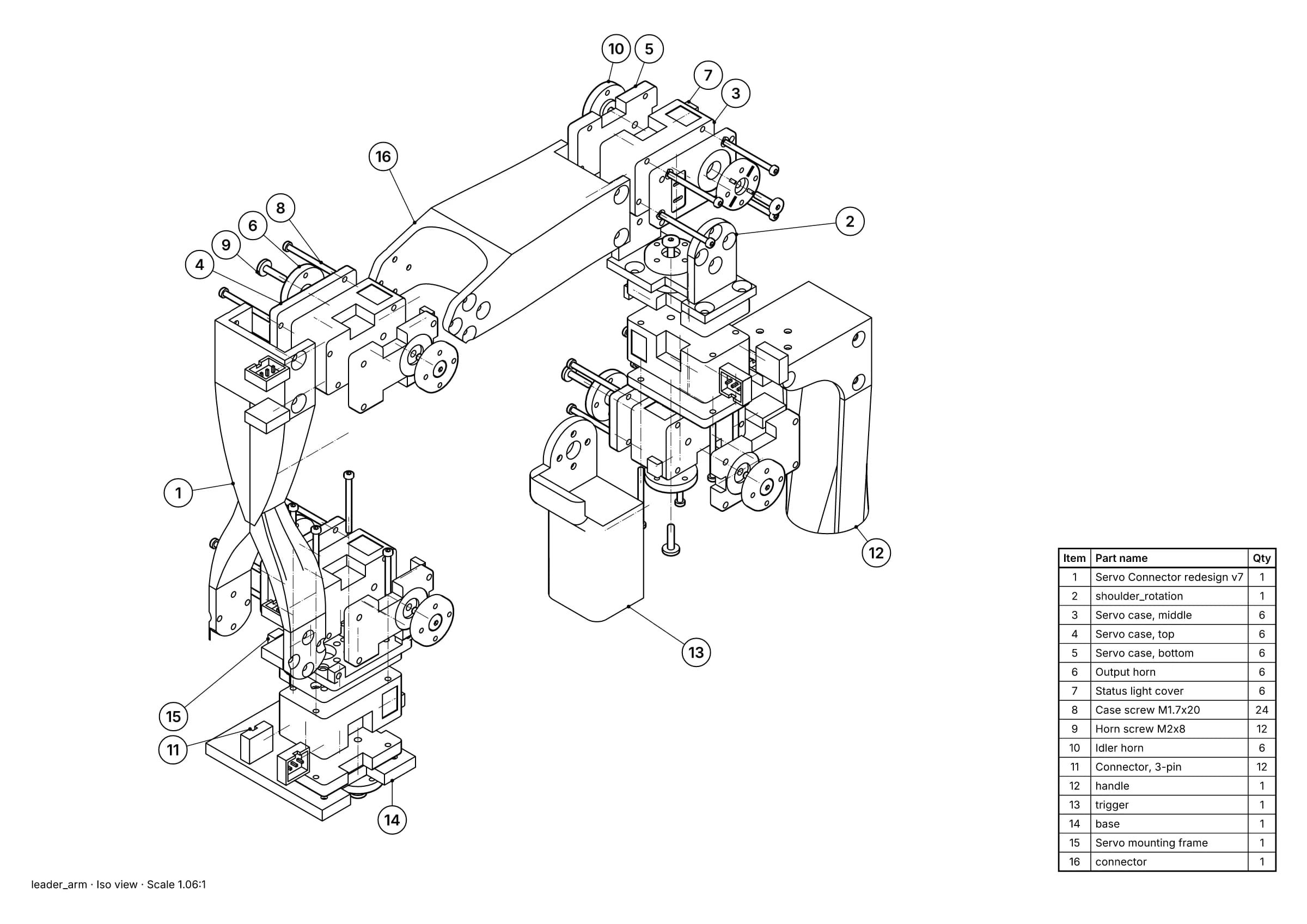
Fig. 1 · leader_arm.step · 16 balloons · 16 items · A3
A printed parts page made from a STEP file: exploded view, balloons and parts list, all line art. Leader arm of Alexander Koch's low-cost robot arm. Model © 2024 Alexander Koch, MIT licence; servo and frame models by Galaxy Technology.
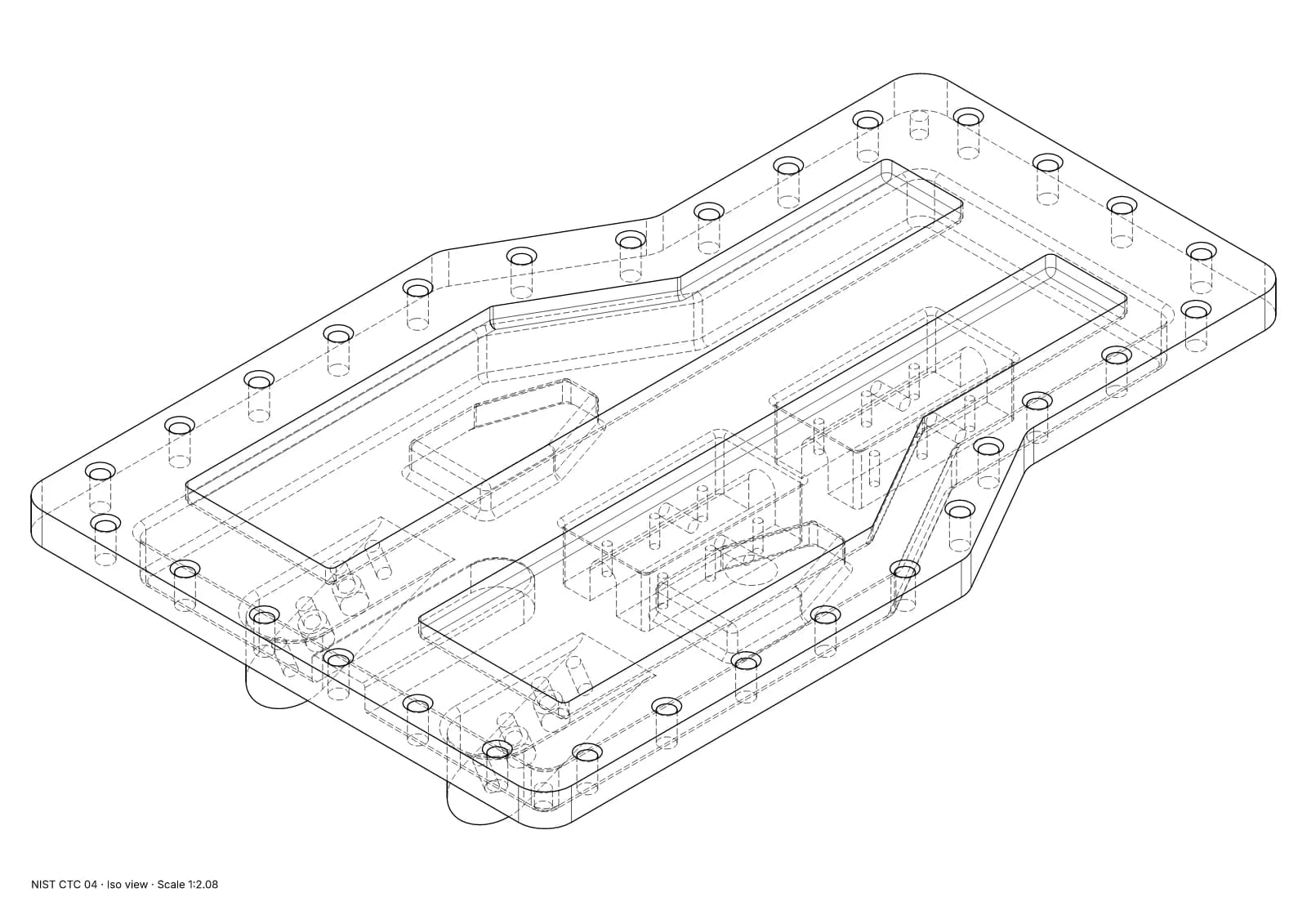
Fig. 2 · NIST CTC 04 · iso view · Technical · 1:2.08 · 854 true arcs · 0 fragments · 0 duplicates
Exact hidden-line removal on a single part: true arcs in the SVG and dashed hidden lines. NIST MBE PMI test part, a US government work used without restriction.
What Cortona3D RapidAuthor does well
- Interactive 3D manuals, parts catalogs and training that a reader can rotate, zoom and play, published as HTML5 for the web and mobile devices.
- Documentation standards used in aerospace, defence and heavy industry: S1000D, ATA 2200, DITA and SCORM.
- A wide range of native CAD and PLM input, including NX, CATIA, Creo, JT and a Teamcenter edition.
- Generated step text and parts tables, multi-language publications, and updates driven by engineering or PLM changes.
- A modular suite: you buy only the components you need, such as RapidIllustrator on its own for illustrations.
Where Lineplate falls short today
- Each project lives in the browser it was made in. Nothing syncs between machines or people, so moving a project means importing its CAD file again.
- There is no 3D, video or animated output, and no EPS or CGM.
- It reads STEP, IGES and BREP, not native CAD files. From SOLIDWORKS, Creo or Inventor you export a STEP file first, and a STEP file that holds only a mesh (tessellated geometry) gives no line drawing.
- Very large assemblies are slow to open in a browser. In our test, a 3D printer of 1,683 placed parts took about 6½ minutes to import with the in-browser kernel. Hidden-line views of open 1,000-part assemblies took 1½ to 5½ minutes, over our one-minute target, and left parts out.
- Auto-explode moves each part in a straight line. A part that can only come out with a twist or a dog-leg is kept together with what traps it and listed for you to deal with. On one 58-part extruder sub-assembly, 6 parts stayed together this way.
- Team shares a workspace and a bill, not files: there are no shared cloud projects, review links or single sign-on.
When to choose Cortona3D RapidAuthor instead
- Your manuals or parts catalogs must follow S1000D, ATA 2200 or DITA, or feed an IETM system.
- Your readers will use interactive 3D or animated procedures, on screen or on a mobile device.
- You work from NX, CATIA, JT or Teamcenter data and want to publish straight from it.
When Lineplate is the better fit
- The output is printed, or sent as a PDF: line drawings, a ballooned parts list and step pages.
- Your models arrive as STEP files and you would rather not install desktop software or manage a licence server.
- You would rather the CAD file stayed on your computer, read by a page in your browser.
- You want to see published prices before you start.
Sources
- 01RapidAuthor, Cortona3D. Read 5 October 2026. The suite, its components and its key features.
- 02Document creation, Cortona3D. Read 5 October 2026.
- 03Various formats, Cortona3D. Read 5 October 2026. Every output format the suite publishes.
- 04RapidManual, Cortona3D. Read 5 October 2026.
- 05RapidIllustrator, Cortona3D. Read 5 October 2026.
- 06Licensing, Cortona3D. Read 5 October 2026.
- 07How to order, Cortona3D. Read 5 October 2026.
- 08Cortona3D RapidAuthor hardware requirements, Cortona3D Knowledge Base. Read 5 October 2026.
- 09Trial form, Cortona3D. Read 5 October 2026.
Facts about our studio describe its code on 5 October 2026. Prices change; check the source before you buy. If anything here is wrong, tell us at hello@lineplate.com and we'll correct it.
Cortona3D, RapidAuthor, RapidManual and RapidIllustrator are names of Cortona3D and its products. Lineplate is not affiliated with, endorsed by or sponsored by Cortona3D.